Jailbreak iOS4 for iPhone 3G, 3Gs and 4 New Bootroom with JailbreakMe 2.0

The iPhone Dev-Team (Comex) has released JailbreakMe 2.0 (aka Star) which can jailbreak all iOS devices on their latest respective firmware like iOS 4.0 / 4.0.1. This does not work with iOS 4.1 Beta release. Since JailbreakMe 2.0 is a userland jailbreak, what this means is that you run it right in your iOS Safari browser to jailbreak the device. It cant get simpler than that !

iPhone 4 Jailbreak

The following step by step instructions, along with video are for iPhone 4, iPhone 3GS (New bootrom / old bootrom) and iPhone 3G users. One thing which is important to note here is that this jailbreak tool doesn’t hacktivate your device. You will need an original supported SIM card to activate your phone with iTunes. If you don’t have an original SIM, you can follow the instructions in this video guide posted here to activate your phone without having the original SIM card.

Step 1: Start iTunes and backup everything from Contacts, Calendars, Photos, Videos and Apps.

Step 2: Update your iPhone 4, 3GS or iPhone 3G on the latest iOS 4.0.1 firmware with iTunes. Download links for the firmware and iTunes 9.2.1 can be found below.

Step 3: Once you are done with the update, make sure you are connected to a WiFi network. I haven’t tested it on 3G so I recommend using it on a reliable WiFi network.

Step 4: Open Safari on your iPhone 4, 3GS or 3G and navigate to http://jailbreakme.com.

Step 5: “Slide to Jailbreak” to begin the jailbreak process.

Step 6: Wait till the jailbreak tool download the required files..

Step 7: Once the download is completed, it will automatically start the jailbreak process. Just don’t do anything silly at this point. Wait till the jailbreak process is completed.

Step 8: Once done, you will be greeted with the following message.

Step 9: Close the browser and look for Cydia. You should now have it on your phone!

Have Fun :D

Read more...
IOS firmware upgrade tutorial for the iPhone 3Gs GM 4.0 (Mac Only)

IOS firmware upgrade tutorial for the iPhone 3Gs GM 4.0 (Mac Only)
All again: iPhone SU do not try it, baseband up & there is no unlock tools from the dev team

Use it at your own risk

Required:
iTunes 2.9 for Mac
GM iOS4.0 firmware download iPhone 3Gs in neatdshare or multiupload

Now how to:
If you want to restore use direct IOS Custom Firmware 4.0 iPhone 3Gs (cydia installed), your iphone from a jailbroken 3.1.2 state .. then use this custom firmware to restore the firmware.. This custom firmware can be downloaded here

But this is no prerequisite broo.. you must be in a state of iPhone 3.1.2 jailbroken

If you circumstances now exist in the firmware 3.1.3 (Non-JB JB ato) you should downgrade to 3.1.2 first, and only able to restore a custom firmware pake above.


How to downgrade from 3.1.3 to 3.1.2 or 4.0GM:

I've never been in Cydia SHSHs backup when running on 3.1.2 & you must edit the hosts file on your pc / laptop .. how to edit the hosts file can read this, I think there already is quite clear, live follow this step by step .. ya remember, the important've had backups in a state SHSH in cydia 3.1.2

Why are you must edit the hosts file backups SHSH: because Apple allows iPhone users ga 3.1.3 / 4.0 to go back to OS 3.1.2 (because they are trying to block the jailbreak, take a look hundreds of cases to lock 3GS iPhone upgrade to 3.1.3 and become an iPod with camera)

Edit the hosts file use: when you restore the firmware like there reading Verifying Firmware right? nah this is to connect to Apple servers to block downgrade to 3.1.2. to edit the hosts file, the connection to the server to server cydia apple replaced by using the backups SHSH that already you have, so essentially you can downgrade to 3.1.2

NB: when you downgrade to 3.1.3 or 3.1.2: an error will appear in 1604, 1605 etc in iTunes .. This is normal & just let it because actually the firmware already installed on the iPhone .. but he's going to go into Recovery Mode (on the iphone iTunes & Cables logo


How to restore:
Quit iTunes
Download Recboot Mac & Windows
Recboot open & click on the Exit Recovery Mode -> he's going to reboot
done, you already went back to 3.1.2 or 3.1.3

Read more...

Tutorial upgrade iOS 4.0

Broadly speaking, the steps we'll do is as follows:
1. Restore directly using iTune
2. Jailbreak using Redsn0w
3. Unlock using Ultrasn0w

For that, need to be prepared the Tools as follows:
- Redsn0w for windows 0.9.5
- IPhone IOS 4.0
- ITunes 2.9 for Windows

After all featuring
With iOS4 already downloaded with the SHIFT key (on keyboard) and click the "Restore". Then navigate to iOS4 you already own.

0.9.5 Jailbreak with Redsn0w

Now it's time to jailbreak with iOS4 us that we already downloaded.
Redsn0w Run as Administrator to prevent errors in the middle of the road
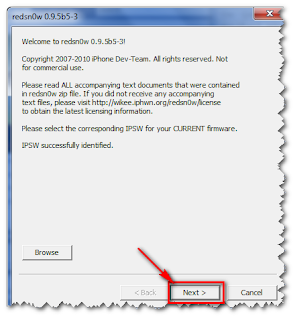
Click the "Browse" and navigate to the file "iPhone1_2_4.0_8A293_Restore.ipsw" (the same files when restore using iTunes) and click "Next" button


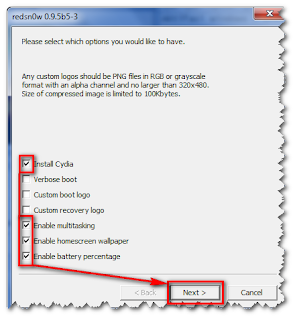
Enable multitasking and only the homescreen wallpaper centangannya dihilangin, agan2 case here .. he said heavily ..


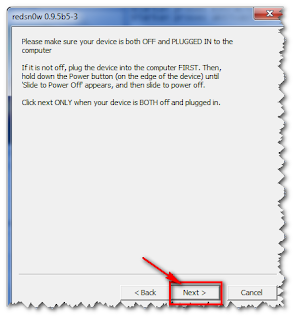
Place your iPhone in the dead and still plugged into the PC and click "Next" button


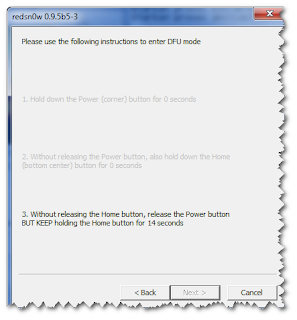
Ready - ready to play the finger ....


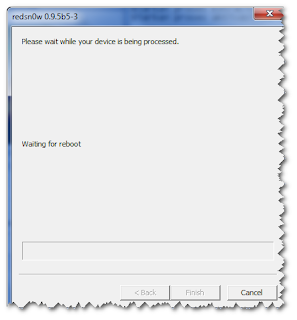
The process is completed and press the Finish button


Iphone is new again ... But there are still problems with the phone signal, To proceed with the steps.

Unlock iOS4
Open Cydia (this is the wifi connection is required)
Essential upgrades if needed
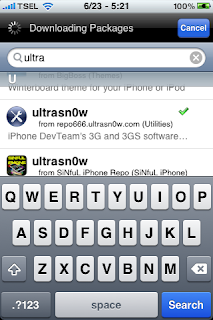
Search ultrasn0w and install


Please wait and then ... ... iphone back function

So hopefully benefit

Read more...

Another Apple iPhone Visual Voicemail Co-Defendant Settles Lawsuit with Klausner Technologies

- For Klausner Technologies Wendy Simmons, 718-522 9873 or 917-327 6188 wendy@vendeloo.com GotVoice, Inc. is the second co-defendant in the patent infringement lawsuit recently filed by Klausner Technologies against Apple, Inc. (APPL:NASDAQ) to have settled the litigation and licensed the Klausner Technologies visual voicemail patents. Other defendants in the case include ATT, Inc. (T:NYSE), Comcast Corporation (CMCSA:NASDAQ), eBay
Inc.'s (EBAY:NASDAQ) Skype and Cablevision Systems Corp.(CVC:NYSE).

The license covers GotVoice's visual voicemail service, which allows subscribers to selectively retrieve voice messages from a mobile phone or computer display. To date, Klausner Technologies has licensed six companies for visual voicemail under its patents. Current licensees include Time Warner's (TWX:NYSE) AOL and Vonage Holdings, Inc. (VG:NYSE), among others.

"We are happy to add GotVoice to our growing list of licensees. GotVoice's visual voicemail is an excellent example of our patented visual voice messaging technology, letting consumers view and select voice messages in a similar fashion to the way they view and select e-mails," said Judah Klausner, CEO of Klausner Technologies.

About Klausner Technologies, Inc.: Klausner Technologies was founded by Judah Klausner, inventor of the PDA and electronic organizer. It owns 25 patents, worldwide, covering visual voice messaging services in which subscribers selectively listen to their messages via their computers or cell phones.

GotVoice Signs Patent License for its Visual Voicemail

Read more...

Apple Upgrades iPhone to 1.1.3, Charges iPod touch Owners $20 for New Apps

For months following the release of Apple's revolutionary iPhone, the news came fast and furiously. In recent times, however, news on the iPhone has been pretty spotty at best (likely to the jubilation of many).

Steve Jobs put an end to the lull in iPhone news today with the introduction of the new 1.1.3 software update. The new update, which is available for free for all iPhone users, adds an upgraded Maps application (which can now triangulate your position using Wi-Fi or cell towers), the ability to text message multiple people at once, Web Clips support, the ability to customize the home screen, and lyrics support within iTunes.

"iPhone doesn’t stand still -- we’re making it better and better all the time," said Jobs, Apple’s fearless leader. "We’ve delighted millions of users with this revolutionary and magical product and it’s great to share these improvements with them."

iPod touch owners will be glad to know that the 1.1.3 software update is also available for them as well. Another big plus is the addition of Mail, Maps, Stocks, Weather and Notes applications from the iPhone.

Users may not be glad, however, when they learn that Apple is charging $19.95 in order to download the application update (separate from the 1.1.3 firmware update). Some contend that these five features should have never been stripped from the iPod touch in the first place, but Apple is now adding in the functionality -- albeit at a price.

All currently shipping iPod touch music players will have the five new apps already installed with no bump in price.

"These amazing new mobile applications make iPod touch not only the best iPod, but the best Wi-Fi mobile device in the world," continued Jobs. "With its revolutionary touch interface and software, plus its stunning 3.5 inch screen, iPod touch is evolving into the first mainstream Wi-Fi mobile platform of the 21st century."

The 1.1.3 update for the iPhone and iPod touch can be downloaded from within iTunes. iPod touch users wishing to receive the new apps, however, will have to get through a payment screen first before proceeding with the software update.

Read more...

Apple tweaks iPhone for business uses

Apple Inc. is tweaking the iPhone to work better with business e-mail, an expected move that is meant to address a key weakness in the popular consumer device.

The company said Thursday that the next software update for iPhones will enable them to work with Microsoft Corp.'s Exchange software, which is widely used by businesses to handle and secure e-mail.

Apple did not say when the update will be available.

The move puts Apple in more direct competition with Research in Motion Ltd.'s BlackBerry and Palm Inc.' Treo smartphones, which are popular among business customers. Many businesses have shied away from the iPhone because it doesn't work well with their e-mail systems.

Copyright 2007 Associated Press. All rights reserved. This material may not be published, broadcast, rewritten, or redistributed.

Read more...

  © Blogger template The Professional Template II by Ourblogtemplates.com 2009

Back to TOP