iOS 4.0.2 available on iTunes. Bad Dream for Jailbreakers


iOS update 4.0.2 is available on the iTunes Store. This firmware 4.0.2 fix the weaknesses of the PDF Viewer on the Safari browser. This weakness was exploited by hackers to Jailbreak iPhone 4.0 and 4.0.1 IOS via Safari.

With this 4.0.2 hackers have to think again how to Jailbreak iPhone. My advice to iPhone users, do not update OS 4.0 and 4.0.1 to 4.0.2.

Read more...

iPhone 3G slower using iOS4 multitask enable

My advice if you are using jaibreake iOS4 on the iPhone 3G, do not ever enable multitasking and wallpapers. Because it will only shorten the life of your 3G iPhone .. The reason is: Memorandum on iPhone 3G is very limited. Using Multitasking and wallpapers will only force the memory on your iPhone 3G and cause overheating memory.

Read more...

Enable or Disable Multitasking and Wallpapers in iPhone 3G and iPod Touch 2G after jailbreaking with JailbreakMe 2.0 ‘Star’

Enable or Disable Multitasking and Wallpapers in iPhone 3G and iPod Touch 2G after jailbreaking with JailbreakMe 2.0 ‘Star’

JailbreakMe has to be the easiest and simplest jailbreak solution in recent times. Sadly, it doesn’t enable the disabled-by-default-by-Apple iOS 4 features for iPhone 3G and iPod Touch 2G i.e. multitasking and home screen wallpapers. Personally, I wouldn’t dare enabling these features as they take the life out of these devices and slow them down terribly, but some people like to have the option available. You can use zToggle to enable or disable multitasking and background wallpapers on iPhone 3G and iPod Touch 2G on the go.ztoggle1
zToggle is available in Cydia for free. It’s a little app that has toggles for multitasking and wallpapers. You can turn either of them on or off after which your iPhone or iPod Touch ill respring and you’ll have that feature working immediately. Pretty neat huh?


ztoggle2[3]This way, you can just enable or disable either of the features or find the right feature that works best for you without sacrificing a lot of performance. Or when things get too slow, just turn them off.


To use zToggle, you need to have a jailbroken iPhone or iPod Touch running iOS 4. Read more on how to use JailbreakMe to do that.

Read more...

Gyroscope on iPhone 4

Apple also introduced a fourth gyroscope on the iPhone is. Gyroscope associated with motion sensor accelerometer that produces six angles, including oblique or rotational play when our bodies. There are also sensors for the compass, proximity, and ambient light. And, in the iPhone there are also four digital book readers like the iPad iBooks. Both content can even be synchronized.

Read more...

How to fix startup freezing on your iPhone

If you experience problem when you want to Update your Apple Firmware (error when the process update stuck and make your iPhone stuck at startup screen.. ) then try this!

  1. re-Format your Windows (if you use windows) <- 100% always works!!
  2. Install again the iTunes
  3. Then try again to update your firmware

Read more...

Startup screen like freezing when using jailbreakme.com to jailbreak my iOS4

After a successful jailbreak using JailbreakMe.com, my iPhone 3Gs FU initial startup (lit) fits apple logo like freezing and suddenly there a loading circle around then hangs for a moment that rotates so (and there is an error screen like so ..) but still my iPhone work fine .. Is that normal? im uncomfortable because when i use BlackRa1n and the spirit to jailbreak 3.1.3 last time, my start up work normaly..

The Answer is
Its Normal when you use jailbreakme.com to jailbreak your iOS4 :D Happy Jailbreaking dude

Read more...

UltraSn0w 0.93: Unlock iPhone 3GS, 3G (All Basebands & Firmwares)


Dev-Team has updated and released UltraSn0w 0.93 unlock for iPhone 3GS and iPhone 3G. UltraSn0w 0.93 can unlock iPhone 3Gs and unlock iPhone 3G with baseband 04.26.06 through 05.13.04 (the latest baseband comes with iOS 4.0). All the UltraSn0w unlock guides are linked below.

IMPORTANT
  • UltraSn0w 0.93 can unlock baseband 04.26.08, baseband 05.11.07, baseband 05.12.01 and latest baseband 05.13.04.
  • How to: check your iPhone Baseband
  • Can unlock firmware iOS 4.0, 3.1.3, 3.1.2, 3.1, 3.0.
  • iPhone 3GS & iPod Touch 3G owners (especially if you used Spirit for your first JB) should stay away from iOS4 for now
  • Your iPhone must be jailbroken. All jailbreak Guides are linked below
  • T-Mobile USA users must disable 3G network first.
UltraSn0w 0.93 unlock is available via Cydia by adding the following source:

http://repo666.ultraSn0w.com

Read more...

Unlock iPhone 4OS 4.0.1 with UltraSn0w 1.0-1 (Baseband 01.59.00)


UltraSn0w 1.0-1 is out to unlock for iPhone 4. This guide is on how to unlock iPhone 4 with UltraSn0w on iOS 4.0.1/4.0 baseband 01.59.00. iPhone 4 unlock instructions can be found below.

IMPORTANT
Your iPhone 4 must already be jailbroken. (How to: jailbreak iPhone 4 with jailbreakme)
UltraSn0w can unlock iPhone 4 baseband 01.59.00 (How to: check iPhone baseband)
Disclaimer: This guide is for educational and informational purposes only. Use it at your own risk. we cannot be held responsible if anything goes wrong.
Unlocking is LEGAL.

Let’s unlock iPhone 4 with UltraSn0w 1.0-1 unlock on baseband 01.59.00.
How to Unlock iPhone 4 with UltraSn0w
***T-Mobile USA users please disable 3G network first.*** Settings >General >Network and turn the “Enable 3G” switch to OFF.
Assuming that your iPhone 4 is already jailbroken:
  • Open the Cydia.
  • Go to manage Tab at bottom.
  • Hit the big Sources button.


  • Hit the Edit button on Top-Right
  • Then Hit the Add button on Top-Left
  • Then Enter the following URL: http://repo666.ultrasn0w.com and hit the Add Source button.


  • Once the Source is added to the Cydia, hit the big return to Cydia button at bottom of the screen and then Done button.
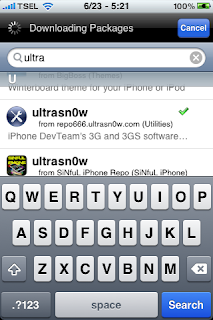
  • Go to Search tab and search for ultrasn0w and install it.


Installing UltraSn0w will unlock iPhone 4 iOS 4.0.1, 4.0 with baseband 01.59.00. Once the installation is completed, reboot your iPhone 4.
Voila! You have unlocked iPhone 4 baseband 01.59.00 with UltraSn0w 1.0-1 and can use SIM from any carrier now.

Read more...

How to Unlock on iOS 4 / 4.0.1 (Any Baseband)

iOS 4.0.1 has just been released by Apple for iPhone 4, iPhone 3GS and iPhone 3G to fix the reception issues which has been problematic for most iPhone 4 users since its launch last month. iPhone 3GS and iPhone 3G users who currently rely on an unlock MUST STAY from iOS 4.0.1 until any further notice. Updating to iOS 4.1 might result in update of baseband, which will potentially lock your phone. You wont be able to unlock it until a new exploit is found again.

How to Unlock iPhone 3GS and 3G on iOS 4 with Ultrasn0w

UPDATE 1: After thorough testing, it turned out that baseband and modem firmware for all iPhones hasn’t been updated in iOS 4.0.1 since iOS 4. What this basically means is that you can still unlock your iPhone on any baseband using ultrasn0w, guide for which can be found here. But since currently there is no jailbreak tool available for iPhone 4 and iPhone 3GS (new bootrom), and the current jailbreak tools for iPhone 3GS (old bootrom) are not compatible with iOS 4.0.1 yet, so the only device which can be currently be jailbroken and unlocked on iOS 4.0.1 is iPhone 3G

Read more...

Jailbreak iOS4 for iPhone 3G, 3Gs and 4 New Bootroom with JailbreakMe 2.0

The iPhone Dev-Team (Comex) has released JailbreakMe 2.0 (aka Star) which can jailbreak all iOS devices on their latest respective firmware like iOS 4.0 / 4.0.1. This does not work with iOS 4.1 Beta release. Since JailbreakMe 2.0 is a userland jailbreak, what this means is that you run it right in your iOS Safari browser to jailbreak the device. It cant get simpler than that !

iPhone 4 Jailbreak

The following step by step instructions, along with video are for iPhone 4, iPhone 3GS (New bootrom / old bootrom) and iPhone 3G users. One thing which is important to note here is that this jailbreak tool doesn’t hacktivate your device. You will need an original supported SIM card to activate your phone with iTunes. If you don’t have an original SIM, you can follow the instructions in this video guide posted here to activate your phone without having the original SIM card.

Step 1: Start iTunes and backup everything from Contacts, Calendars, Photos, Videos and Apps.

Step 2: Update your iPhone 4, 3GS or iPhone 3G on the latest iOS 4.0.1 firmware with iTunes. Download links for the firmware and iTunes 9.2.1 can be found below.

Step 3: Once you are done with the update, make sure you are connected to a WiFi network. I haven’t tested it on 3G so I recommend using it on a reliable WiFi network.

Step 4: Open Safari on your iPhone 4, 3GS or 3G and navigate to http://jailbreakme.com.

Step 5: “Slide to Jailbreak” to begin the jailbreak process.

Step 6: Wait till the jailbreak tool download the required files..

Step 7: Once the download is completed, it will automatically start the jailbreak process. Just don’t do anything silly at this point. Wait till the jailbreak process is completed.

Step 8: Once done, you will be greeted with the following message.

Step 9: Close the browser and look for Cydia. You should now have it on your phone!

Have Fun :D

Read more...

IOS firmware upgrade tutorial for the iPhone 3Gs GM 4.0 (Mac Only)

IOS firmware upgrade tutorial for the iPhone 3Gs GM 4.0 (Mac Only)
All again: iPhone SU do not try it, baseband up & there is no unlock tools from the dev team

Use it at your own risk

Required:
iTunes 2.9 for Mac
GM iOS4.0 firmware download iPhone 3Gs in neatdshare or multiupload

Now how to:
If you want to restore use direct IOS Custom Firmware 4.0 iPhone 3Gs (cydia installed), your iphone from a jailbroken 3.1.2 state .. then use this custom firmware to restore the firmware.. This custom firmware can be downloaded here

But this is no prerequisite broo.. you must be in a state of iPhone 3.1.2 jailbroken

If you circumstances now exist in the firmware 3.1.3 (Non-JB JB ato) you should downgrade to 3.1.2 first, and only able to restore a custom firmware pake above.


How to downgrade from 3.1.3 to 3.1.2 or 4.0GM:

I've never been in Cydia SHSHs backup when running on 3.1.2 & you must edit the hosts file on your pc / laptop .. how to edit the hosts file can read this, I think there already is quite clear, live follow this step by step .. ya remember, the important've had backups in a state SHSH in cydia 3.1.2

Why are you must edit the hosts file backups SHSH: because Apple allows iPhone users ga 3.1.3 / 4.0 to go back to OS 3.1.2 (because they are trying to block the jailbreak, take a look hundreds of cases to lock 3GS iPhone upgrade to 3.1.3 and become an iPod with camera)

Edit the hosts file use: when you restore the firmware like there reading Verifying Firmware right? nah this is to connect to Apple servers to block downgrade to 3.1.2. to edit the hosts file, the connection to the server to server cydia apple replaced by using the backups SHSH that already you have, so essentially you can downgrade to 3.1.2

NB: when you downgrade to 3.1.3 or 3.1.2: an error will appear in 1604, 1605 etc in iTunes .. This is normal & just let it because actually the firmware already installed on the iPhone .. but he's going to go into Recovery Mode (on the iphone iTunes & Cables logo


How to restore:
Quit iTunes
Download Recboot Mac & Windows
Recboot open & click on the Exit Recovery Mode -> he's going to reboot
done, you already went back to 3.1.2 or 3.1.3

Read more...

Tutorial upgrade iOS 4.0

Broadly speaking, the steps we'll do is as follows:
1. Restore directly using iTune
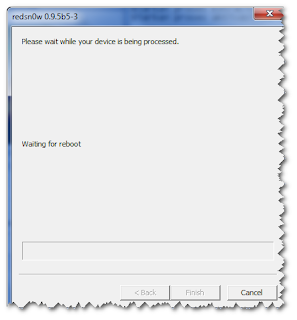
2. Jailbreak using Redsn0w
3. Unlock using Ultrasn0w

For that, need to be prepared the Tools as follows:
- Redsn0w for windows 0.9.5
- IPhone IOS 4.0
- ITunes 2.9 for Windows

After all featuring
With iOS4 already downloaded with the SHIFT key (on keyboard) and click the "Restore". Then navigate to iOS4 you already own.

0.9.5 Jailbreak with Redsn0w

Now it's time to jailbreak with iOS4 us that we already downloaded.
Redsn0w Run as Administrator to prevent errors in the middle of the road
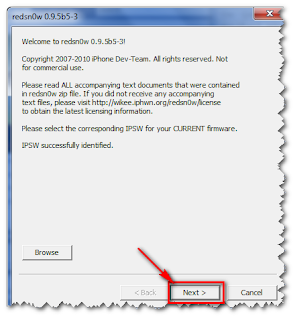
Click the "Browse" and navigate to the file "iPhone1_2_4.0_8A293_Restore.ipsw" (the same files when restore using iTunes) and click "Next" button


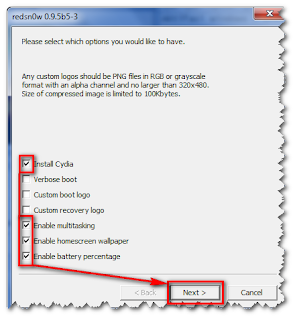
Enable multitasking and only the homescreen wallpaper centangannya dihilangin, agan2 case here .. he said heavily ..


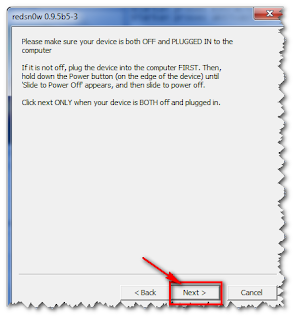
Place your iPhone in the dead and still plugged into the PC and click "Next" button


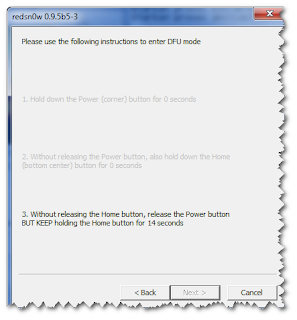
Ready - ready to play the finger ....


The process is completed and press the Finish button


Iphone is new again ... But there are still problems with the phone signal, To proceed with the steps.

Unlock iOS4
Open Cydia (this is the wifi connection is required)
Essential upgrades if needed
Search ultrasn0w and install


Please wait and then ... ... iphone back function

So hopefully benefit

Read more...

Another Apple iPhone Visual Voicemail Co-Defendant Settles Lawsuit with Klausner Technologies

- For Klausner Technologies Wendy Simmons, 718-522 9873 or 917-327 6188 wendy@vendeloo.com GotVoice, Inc. is the second co-defendant in the patent infringement lawsuit recently filed by Klausner Technologies against Apple, Inc. (APPL:NASDAQ) to have settled the litigation and licensed the Klausner Technologies visual voicemail patents. Other defendants in the case include ATT, Inc. (T:NYSE), Comcast Corporation (CMCSA:NASDAQ), eBay
Inc.'s (EBAY:NASDAQ) Skype and Cablevision Systems Corp.(CVC:NYSE).

The license covers GotVoice's visual voicemail service, which allows subscribers to selectively retrieve voice messages from a mobile phone or computer display. To date, Klausner Technologies has licensed six companies for visual voicemail under its patents. Current licensees include Time Warner's (TWX:NYSE) AOL and Vonage Holdings, Inc. (VG:NYSE), among others.

"We are happy to add GotVoice to our growing list of licensees. GotVoice's visual voicemail is an excellent example of our patented visual voice messaging technology, letting consumers view and select voice messages in a similar fashion to the way they view and select e-mails," said Judah Klausner, CEO of Klausner Technologies.

About Klausner Technologies, Inc.: Klausner Technologies was founded by Judah Klausner, inventor of the PDA and electronic organizer. It owns 25 patents, worldwide, covering visual voice messaging services in which subscribers selectively listen to their messages via their computers or cell phones.

GotVoice Signs Patent License for its Visual Voicemail

Read more...

Apple Upgrades iPhone to 1.1.3, Charges iPod touch Owners $20 for New Apps

For months following the release of Apple's revolutionary iPhone, the news came fast and furiously. In recent times, however, news on the iPhone has been pretty spotty at best (likely to the jubilation of many).

Steve Jobs put an end to the lull in iPhone news today with the introduction of the new 1.1.3 software update. The new update, which is available for free for all iPhone users, adds an upgraded Maps application (which can now triangulate your position using Wi-Fi or cell towers), the ability to text message multiple people at once, Web Clips support, the ability to customize the home screen, and lyrics support within iTunes.

"iPhone doesn’t stand still -- we’re making it better and better all the time," said Jobs, Apple’s fearless leader. "We’ve delighted millions of users with this revolutionary and magical product and it’s great to share these improvements with them."

iPod touch owners will be glad to know that the 1.1.3 software update is also available for them as well. Another big plus is the addition of Mail, Maps, Stocks, Weather and Notes applications from the iPhone.

Users may not be glad, however, when they learn that Apple is charging $19.95 in order to download the application update (separate from the 1.1.3 firmware update). Some contend that these five features should have never been stripped from the iPod touch in the first place, but Apple is now adding in the functionality -- albeit at a price.

All currently shipping iPod touch music players will have the five new apps already installed with no bump in price.

"These amazing new mobile applications make iPod touch not only the best iPod, but the best Wi-Fi mobile device in the world," continued Jobs. "With its revolutionary touch interface and software, plus its stunning 3.5 inch screen, iPod touch is evolving into the first mainstream Wi-Fi mobile platform of the 21st century."

The 1.1.3 update for the iPhone and iPod touch can be downloaded from within iTunes. iPod touch users wishing to receive the new apps, however, will have to get through a payment screen first before proceeding with the software update.

Read more...

Apple tweaks iPhone for business uses

Apple Inc. is tweaking the iPhone to work better with business e-mail, an expected move that is meant to address a key weakness in the popular consumer device.

The company said Thursday that the next software update for iPhones will enable them to work with Microsoft Corp.'s Exchange software, which is widely used by businesses to handle and secure e-mail.

Apple did not say when the update will be available.

The move puts Apple in more direct competition with Research in Motion Ltd.'s BlackBerry and Palm Inc.' Treo smartphones, which are popular among business customers. Many businesses have shied away from the iPhone because it doesn't work well with their e-mail systems.

Copyright 2007 Associated Press. All rights reserved. This material may not be published, broadcast, rewritten, or redistributed.

Read more...

iPhone on E-Bay

Thousands of iPhones are on eBay just hours after going on sale, despite a flawed registration process.

Apple iPhone takes America (and eBay) by storm

Apple have been left with quite a few disgruntled customers after the computerised registration process virtually came to a standstill, due to the high volume of customers all trying to register within a few hours of purchase.


The problem was made worse by a mix up with customers of Cingular, which was recently acquired by AT&T. It seems that Cingular customers who were transferred over the AT&T have been accidentally flagged as business customers – but only residential / individual customers are able to subscribe to iPhone plans. So customers affected have had to spend valuable time on hold to customer and technical services to resolve the problems.

Some new iPhone owners waited over 24 hours to register their iPhone through iTunes, and AT&T have stated that it could take up to 36 hours to activate some accounts – which is a kick in the teeth if you have waited for hours (and in many cases days!) outside an Apple or AT&T store to be first in line to use one.

It seems that many of the customers that waited in line for a handset weren’t actually buying for themselves as thousands of handsets have flooded eBay since Friday night. At the time of writing eBay.com currently have just less than 6,000 listings under iPhone, and eBay.co.uk have 47. Although it is unknown how well the USA iPhone will work in the UK as the iPhone is locked to AT&T, and of course there is the tricky registration process with AT&T.

Read more...

iPhone in Japan

Although I started out as somewhat of a skeptic about the iPhone, mainly in reaction to the blanket news coverage it has been receiving, reflecting on the situation I now consider that the iPhone has what it takes to be big in Japan; indeed to become the very first foreign mobile phone (Sony-Ericsson doesn’t countas foreign!) to be a success in Japan’s rather insular market. There are, however, a small number of additions and modifications that I propose Apple must make to the hardware, software, and design before they can consider selling it in Japan.

iPhone: Japan’s carriers
Looking at the market image of the three big mobile phone carriers, namely NTT DoCoMo, au by KDDI, and SoftBank, the most natural fit would be au, as according to many surveys they have the strongest image for being on the leading edge and for supporting music playback on their phones. However, if a bidding war starts, SoftBank may be prepared to lay the most cash on the table as they are most desparate for customers, and with Cameron Diaz and Bradd Pitt pushing an American image of talking on the phone for SoftBank, SoftBank’s president Masayoshi Son may see the iPhone as a natural extension of his brand. Therefore, I predict there will be a SoftBank iPhone on the shelves early next year.

iPhone: Japan needs 3G
It needs it in the US and in Europe too, so no more needs to be said about it. All Japanese carriers have stopped making new 2G models, so the iPhone must have 3G speeds to avoid being labeled as outdated.

iPhone: Japan needs a worse browser
Safari has been getting rave reviews in the USA, but the Japanese have been browsing for years in the walled garden of made-for-mobile web sites authored in C-HTML, Compact-HTML. There are too many existing services that are already designed for mobile phones for Apple to ignore, so they need to provide a downgraded browser that can support these sorts of sites without any fancy zooming or panning, just scrolling up and down.

iPhone: Japan needs emoji
Nearly three in four Japanese currently sprinkle some or all of their email with small colourful dingbat-like icons built into the phones from all of the major providers. The current methods of selecting these characters seriously needs a usability make-over that people look to Apple to implement, but without smilies, the average Japanese cell phone email would look naked and dull.

iPhone: Japan needs a retro keyboard
The biggest thing that the English-language iPhone seems to have got wrong is the keyboard. With Japanese, this style of keyboard will be even more problematic, and with many people as familiar, if not more familiar, with mobile-phone style keyboards as with traditional QWERTY ones, Apple should accept that as with the browser issues above, the older and more familiar methods of input need to be supported too. As with emoji above, I’m looking to Apple to sprinkle its magic pixie dust over the UI and the input prediction methods, but the underlying paradigm should be the standard 10-key method.

iPhone: Japan needs a strap hook
Almost everyone in Japan hangs some sort of mascot character on their phones, so without a mounting point for these straps, the iPhone will look very bare indeed. It’s just a very small thing, but it’s important and shows to potential consumers that Apple cares about Japan and Japanese sensibilities.

iPhone: Japan has it all already
A common theme running through various articles on the impending failure of the iPhone to penetrate the Japanese market is that all the features exist already in cell phones available in Japan today. While this point is indeed true and the raw feature set of the iPhone has little that is revoultionary, one need only look to Nintendo’s Wii and DS, which on paper are rather limited, or even in fact the iPod, which entered a Japanese market already crowded with offering from both domestic and overseas manufactures, yet still swempt them all away mostly on the strength of brand image and slickly integrated product. I believe the iPhone can help Apple make history repeat itself.

iPhone: Japan doesn’t need…
A recent survey showed that two requirements high in potential purchasers’ minds were One Seg digital terrestrial television and RFID-based electronic cash solutions. However, other surveys have shown that despite the fact that most new models support one or both of these features, the actual percentage of users accessing these features is rather limited. With YouTube support, One Seg television becomes less important, and many more people use traditional card-based electronic cash systems than use mobile phone-embedded FeliCa IC card chips.

Conclusion
Next year we will see a SoftBank Apple iPhone which while it may not replicate the roaring success of the iPhone in the USA or of the iPod in Japan, it will make a definite impact and change the face of the Japanese cell phone market. Up until now there has been perhaps just too cosy a relationship between the carriers and the manufacturers which while not stifling innovation, excluding physical design issues it has not encouraged manufacturers to be bold or different. Even if the iPhone itself never manages to gain a significant market share, its mere presence on the Japanese market can only benefit consumers.

Read more...

Find Cell Phone Number

Find Cell Phone Number - Click the Link Above to read more

Have you ever noticed how it can be impossible to find something when you most need it? Phone numbers are no different. this is why free cell phone number search services are so popular right now. But there is an art to using them, which is what I will be covering on this article.

The fact is, that it's not very straightforward to do a free cell phone number search. There are a number of reasons for this, but the main one is that all cellphone numbers are unlisted! As you can imagine, this makes it a lot harder to find a cellphone number then a regular residential number.

Luckily, there are a number of volunteer maintained cell phone number directories. These websites work on the basis of requesting the visitors type in their cellphone numbers so that other people can do a free cell phone number search later. While this is a good idea, the fact is that very few cellphone numbers exist on the sites, because they are fairly new, and most people have not visited these sites yet.

There is a way to do a free cell phone number search for numbers which are not listed in these directories, using search engines you already familiar with like Google. Believe it or not, many people actually publish their cellphone number on the Internet without realising it! There are a number waiters can happen, for instance, sometimes people list a classified ad in a newspaper. What they don't realise, is that this newspaper will be published on the Internet as well as on paper.

Another way that people can publish their information on the Internet he's when they register for discussion groups or message boards. They usually fill in personal contact details, which are then published on the website.

So all you need to do, is type details from the person you're looking for into Google and see what comes up. Now before you get your hopes up high, most of the time you won't get any result is doing a free cell phone number search this way. But at times, you will find everything you need just by doing this.

When all else fails, your best bet is to use one of the cheap reverse phone number search and unlisted cell phone number directories. These are websites which collect together information from a large collection of sources, to provide you with details about people and their phone numbers. They lists cell phone numbers and unlisted phone numbers, as well is a lot of information about the people who own these phones.

While it is true that this is not strictly a free cell phone number search, you're much more likely to find the information you are looking for on one of these sites. You can find out more about them by following the links below.

Well, that's the big picture. I go into more detail about the specifics on my site, so if you want to know more click on that link. Happy searching!

Read more...

iPhone is Wap killer

iPhone is more than just a breakthrough mobile phone device. It is a strategy that may expand Apple's sphere of influence, from web browsing to social networking and even possibly search.

The iPhone is here. The blogosphere is echoing with both great praise and cries of problems. The hype was both met and a bit too much. Overall, it seems that both media and users are underwhelmed with the iPhone as the phone. And people are not overly excited about yet another iPod, because we've had plenty of those over the last few years. Yet, iPhone is important and possibly game changing - because it could be the first mobile device to truly bring a rich web experience to a mobile device. With iPhone and the latest release of Safari for Windows, Apple has openly jumped into the browser wars. And finally, and perhaps most importantly, iPhone could be Apple's foray into the world of social networking. Let's take a deeper look along each of these axes.

Is iPhone a WAP killer?
Until iPhone showed up on the scene, the web experience on Mobile devices was drastically different compared to PC access. For mobile, Web Sites and Services reduced the amount of the information on each page and displayed it using Wireless Application Protocol (WAP) and Wireless Markup Language (WML). Even the Blackberry, known for its exceptional innovation in the wireless space, had to do a lot of heavy lifting to squeeze the Web into a small screen.

The worst part about the WAP solution was that each web site needed to present its results using a different format, if it wanted to be browseable from a wireless device. Doing double work for content owners is both time-consuming and error prone, so only large companies invested in doing this. Which means that the long tail of the Internet was, for the most part, inaccessible from wireless devices.

Apple took an entirely different approach and focused on making web sites work on the iPhone, as is. Since iPhone runs OS X Safari, for designers it is only a matter of figuring out how to make web pages fit onto a small screen. Naturally, there are already several technologies that exist to help people browse when the content does not fit onto a screen - scrolling, paging and zooming. So Apple combined its innovative multi-touch technology with some old ideas, to deliver a complete browsing experience to the iPhone users. How well it will work remains to be seen. Particularly, will people be able to master multi-touch and will they like the experience of looking at pieces of a web page? If the answer is yes, then the iPhone will break the Web out of the WAP prison.


Can Safari Succeed in the Browser Wars?
Apple carefully aligned the launch of iPhone with the launch of Safari on Windows. There is no way this is a coincidence. Why does Apple want to jump into the browser wars? The answer is that anybody who has a shot wants to be part of this war; and with the iPhone, Apple actually does have a shot.

The current state of browsers is in a flux. Microsoft's Internet Explorer is receding, but not as quickly as some thought. Firefox is gaining, but again not as quickly. Apple sees an opportunity - because neither opponent is playing the perfect game. If iPhone becomes popular, Apple possibly has a decent chance of success in the browser wars, because people like to use the same application everywhere. Today's Safari is a no bells and whistles, quick and robust web browser. It has less features than Firefox, but it also has a lot of die hard fans in the Mac community.

You can get more details about the current state of the browser war battlefield from our reviews. We profiled Firefox 2.0 and Internet Explorer 7.0 when both came out. We also wrote two posts about the browser wars: Web Browser Faceoff and Why Browser Wars Will Heat up in 2007. The first post hit a nerve with Safari fans, because we described it as less modern than other browsers. The second post was focused on the economics of the war; and is very applicable to Apple's jump into this market. Winning the browser wars equals winning control over Web eyeballs and the precious search box. Apple knows this very well and is likely to have more tricks up its sleeve, like a new version of Safari.

Can iPhone jumpstart Apple in Social Networking?
Apple has not been very active in the social networking space so far. Sure it is a consumer electronics company, but still - a social network would be very complementary. Well, with iPhone hitting the streets, Apple might have pulled itself into this lucrative market with the speed of light. What better social network can you wish for than a phone book? Family, friends and business contacts all end up in our phones. Apple is very likely to tap into this huge network of subscribers. Because we take our mobile phones with us everywhere - and certainly this will be the case with the feature-packed iPhone - Apple has a chance at pulling off some serious upsets in the social networking space.

The fact that Apple is going to have control of the native iPhone applications for phone and chat will give it big leverage. As people interact with each other, the software can learn a lot about user behavior and build a social system that leverages this behavior. A simple example is a filter that is currently missing in Facebook. Currently in Facebook all updates from my contacts are treated equally. Anytime anyone does anything, I get informed. This is already annoying to many users. With the iPhone, Apple can quickly gather data about how much interaction we have with each other - and so build a heuristic for filtering information based on that.
Conclusion

iPhone is more than just a breakthrough mobile phone device. It is a strategy that may expand Apple's sphere of influence, from web browsing to social networking and even possibly search. If iPhone users embrace the multi-touch interface for browsing the web, then WAP will become obsolete. If Safari on iPhone and Windows manages to win peoples hearts, then Apple might gain a position in the browser market - perhaps as strong as Firefox. Incidentally, for now this plays in Google's favor, as Google is friendly with both Firefox and Apple. And if Apple starts building a social network around the iPhone, then MySpace and Facebook will have to start paying attention.

All of these things are of course 'big ifs'. But we have no reason to doubt either the seriousness or ability of Apple. Since Steve's job return in 1997, the company has not disappointed. So are all and any of these possible? Definitively - and very likely too. Apple is playing this game to win and to win big. Lets see what happens next and in the mean time, please share your thoughts on what part iPhone will play in Apple's business strategy.

Read more...

Available in 16Gb

iPhone is a revolutionary new mobile phone that allows you to make a call by simply tapping a name or number in your address book, a favorites list, or a call log. It also automatically syncs all your contacts from a Windows PC, Mac, or Internet service. And it lets you select and listen to voicemail messages in whatever order you want — just like email. iPhone is available in an 8GB model for $399 and a new 16GB model for $499.

Read more...

  © Blogger template The Professional Template II by Ourblogtemplates.com 2009

Back to TOP